• Skip to content
  • Skip to primary sidebar
  • Skip to footer

All My Systems

Improve Quality . Reduce Risk

01422 824831
  • What We Do
    • CRM for sales
    • CRM for customer service
    • CRM for marketing
    • CRM for social monitoring
    • Support
    • Training
  • CRM
    • New to CRM?
    • Already using CRM?
    • Using Dynamics CRM?
  • Knowledge
    • Outlook
    • CRM
    • Engagement
    • sub cat
  • Case Studies
  • About us
    • Contact Us
    • News
    • Press Coverage
    • Join Our Team

How To: Personalise your Dynamics CRM Online Screens

One of the great features of the Spring Update 1 for CRM Online 2015 (released May 2015) was the ability to personalise the look of CRM to your business. This is a great addition to CRM’s features plus it has the following benefits:

  • Add your logo and CRM Online aligns with your company brand
  • Apply your brand colours to your CRM Online User Interface (UI) elements
  • Improved user adoption as users engage with a system that is personalised with a familiar look and feel

How to change the theme options – 5 easy steps

  1. Navigate to Settings->Customizations and click Themes
  2. The CRM Default Theme will be displayed in the view, click +New to add your new theme
  3. Use our quick reference style and layout guide below to assist you, and you might find it useful to have the hexadecimal colour schemes for your brand to hand e.g. #000000 for black to #ffffff for white
  4. Make the changes to the fields, for your logo we recommend using a logo 50px high
  5. Save your changes when you are finished, and click Publish Theme in the command bar to publish your new theme. This will reload the page and your new colour scheme will be applied throughout your CRM Online environment

Quick reference style and layout guide
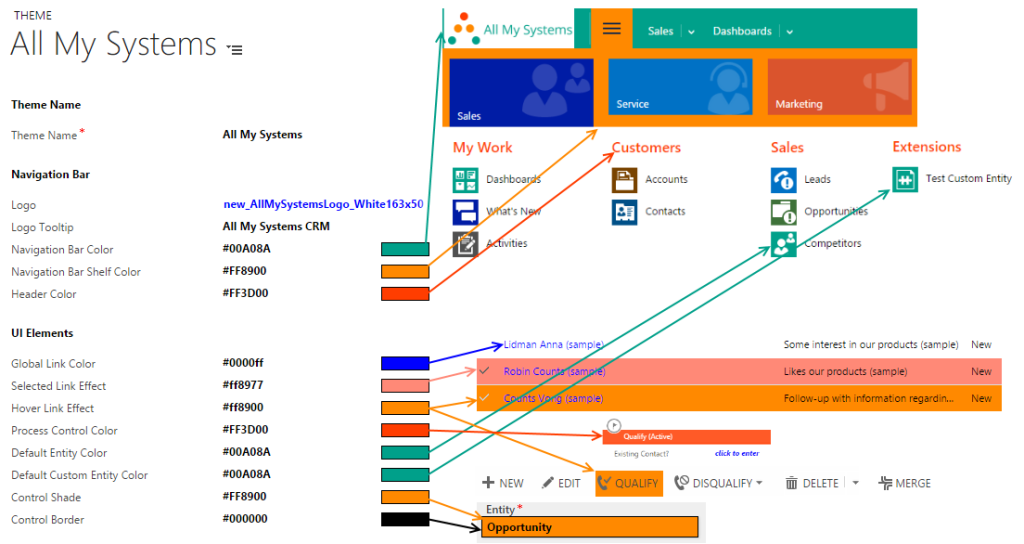
 

CRM Online 2015 theme reference - AMS ThemeUseful resources

  • CRM Help & Training – Change the color scheme or add a logo to match your organisation’s brand

We hope you found this How To guide useful, and have some fun customising the look of your CRM system!


Get the latest articles sent to your inbox

Never more than weekly. No spam, ever.

Primary Sidebar

Recent posts

  • Simply Better Events
  • ColLABorate 5th September 2016
  • Huddersfield based CRM solutions specialist triples turnover in only its second year of business
  • Are you missing out on insightful management information because of your current database?

More topics

Activities | Business | Cases | Communication | Consistency | CRM | crm databases | Data | databases | Data quality | Email | Engagement | ETHICS | Existing users | Gamification | Growth | Integration | Job satisfaction | Knowledge Base | Media coverage | Memory lane | Modelling | Numbers | Opportunities | Outlook | Performance | Process | Processes | Productivity | prospecting new clients | Reporting | Search | SQL Server 2008 | System Customiser | Testing | Users
Microsoft Dynamics CRM
We're a Microsoft specialist in Dynamics CRM
ClickDimensions Email Marketing and Marketing Automation for Microsoft Dynamics CRM

ClickDimensions partner
Email Marketing & Marketing Automation for Microsoft Dynamics CRM

BCS Professional Member - The Chartered Institute for IT

BCS Professional Member
The Chartered Institute for IT

BCS Professional Member - The Chartered Institute for IT

5

Footer

Contact

All My Systems Ltd
3M Buckley Innovation Centre, Firth Street, Huddersfield, HD1 3BD

P: 01422 824831
E: hello@allmysystems.co.uk

Company No: 08977758


We are proud to support Forget Me Not Children's Hospice
Forget me not children's hospice

Memberships

Connect Yorkshire
BNI

Recent knowledge posts

Are you missing out on insightful management information because of your current database?

Is your prospect database stifling growth?

Empowering your people through the CRM knowledge base

More Posts

© 2026

  • Contact
  • About
  • Jobs
  • Knowledge
  • Case Studies
blog