“I don’t have access to all the database fields I need for my reports”
“Our reporting system isn’t very flexible and it doesn’t tell me what I need to know”
“I have to go back to our supplier each time I want a slight variation on a report, I want to do it myself!”
These are just some of the common issues we hear when discussing databases and reporting with business owners and managers.
It’s your database, it’s your data. You should be able to easily run the reports and insight you need when you need them, across every field and module – that’s a good starting point.
You may have read our previous posts about the importance of good quality reporting in your business.
In summary the right reports provide you and your team with the insight and knowledge you need to run your business. They provide confidence that you’re heading in the right direction. Whether this is for:
- Managing prospects
- Tracking sales activity
- Analysing your sales pipeline
- Coordinating customer service and helpdesk enquiries, or
- Keeping track of your ongoing projects
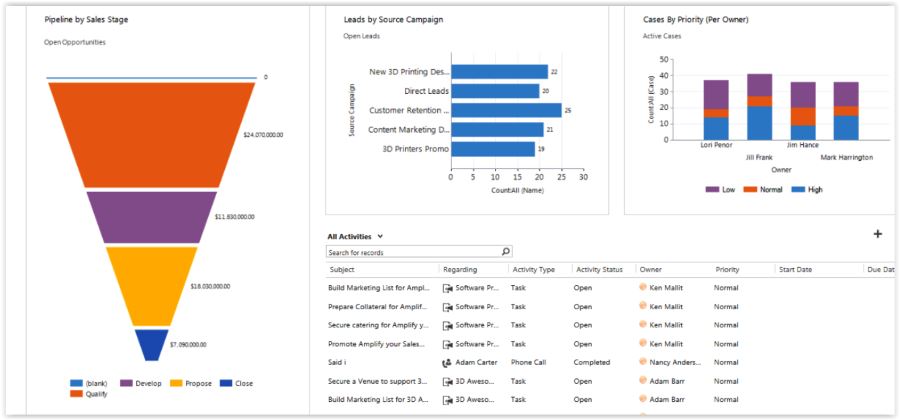
The right reports are crucial to your continued confidence that your daily business activities are contributing to your weekly, monthly, annual and long term goals.
A key part of this confidence is down to the capability of your business database and the reporting tools it provides. Your business database may include one or more of the following:
- A specialist market/sector database e.g. insurance, services, financial services
- Microsoft Dynamics CRM
- Another CRM system
- Contact management systems
- A mixture of spreadsheets, access databases, and other bespoke systems
Whatever your starting point we want to help you answer the question “Am I missing out on insightful management information because of our current database?”
During this series of articles we are going to explore the importance of having the right reporting tools to help you run your business. These tools include:
- Bar charts, column charts, line charts, pie charts, scatter charts
- Filtered data views with columns, sorting, and segmentation of key data items
- Dashboard reports displaying cross module information in a single place
- Gauges, indicators and other ways of visualising Key Performance Indicators (KPIs)
- Microsoft Excel
I’ll be drawing on the capabilities of Microsoft Dynamics CRM 2016 which provides a range of powerful and flexible options to meet any reporting needs, each of them with their own strengths, which can be combined to deliver insightful management information about your business.
Over the next 6 weeks this series will cover:
- Interactive charts and data views – Flexible and user defined views and charts with drill down analysis and dynamics filtering so you can quickly access real time data when you need it
- Reports – User defined reports which unlock access to all fields and provide powerful grouping and totaling functionality and the ability to link reports together to drill through from one report to another report
- Dashboards – The ability to combine charts, views, external reports and advanced SSRS reports into a single user interface which can provide information across all database modules in one easy to view dashboard report
- Excel Templates – Your favourite analysis tool of choice is available directly within Microsoft Dynamics CRM – with custom calculations, pivot tables, charts and a wide range of Excel functionality
- Dynamic Excel Reports – Excel reports that automatically refresh from live data whenever you use them. Combine the full range of Excel functionality at your fingertips with refreshable data to provide all your reporting needs
- Advanced SSRS Reports – the ultimate in custom built interactive user reporting across your whole database with tables, lists, charts, gauges, clickable reports, drill down reporting and sub-reporting being just some of the features available – directly within a CRM dashboard
Each article in this series will explore one of these powerful tools in detail with screenshots and short videos that demonstrate how they can make a huge impact on your business.
If you get frustrated with your current reports, or if you cannot easily access all the fields in your database, follow our articles to learn the options available to you.
See you next time!